
Webhook Notificiations
In V1.2 we also introduced webhook notifications. These allow you to use the new action hooks
- flowmattic_trigger_wpcw_user_completed_unit
- flowmattic_trigger_wpcw_user_completed_module
- flowmattic_trigger_wpcw_user_completed_course
- flowmattic_trigger_wpcw_enroll_user
This new interface allows you to select a trigger and add a webhook address to send the payload to on trigger
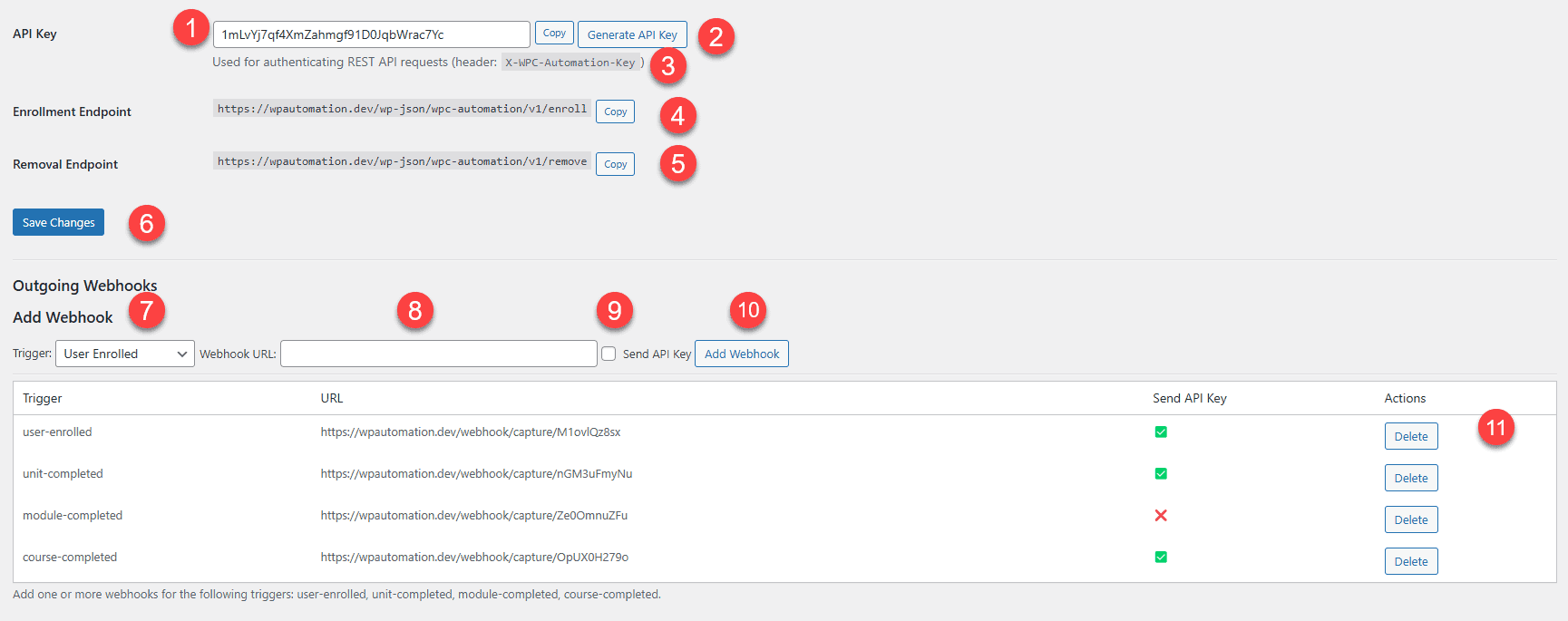
You select a trigger name in (7) which matches the table below and you then add the webhook address in (8) which should be triggered for that trigger, and it will get the appropriate payload (9) allows you to check for authentication using the API key set in (1) you can then add your webhook using 10.
| Trigger | Trigger Name (Admin) |
|---|---|
| flowmattic_trigger_wpcw_user_completed_unit | unit-completed |
| flowmattic_trigger_wpcw_user_completed_module | module-completed |
| flowmattic_trigger_wpcw_user_completed_course | course-completed |
| flowmattic_trigger_wpcw_enroll_user | user-enrolled |
Each trigger should be able to have more than one webhook, so you may want two sets of automation for example, on a user enrollment,t and each webhook can be authenticated or not depending on if you need this ability.
You can remove a webhook by using the delete button (11)