Manually Giving / Revoking Access
Giving Access
Sometimes you may want to give access to a post without following the surecart model, I.e for testing or to your team so they have access without editing the post to view content. This can easily be achieved the storage and allocation of what a user has access to is stored in there user metadata and as such is free text that can be altered.
- Navigate to a user and click on edit
- Scroll down to the bottom and you will see the below metabox
- You can add or remove post IDs from here They should be followed with a comma and look like this 14,20,35 as an example

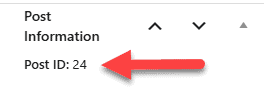
To add or remove, you need the post_id that is shown in protecting your first post, and you are looking for the following box, which will make it easy to identify the post