
Protect your first post
Protecting Your First Post
It’s now time to protect your first post using Post Access Manager for SureCart. when you go to your post, you will notice a new metablock, and this will appear in all posts
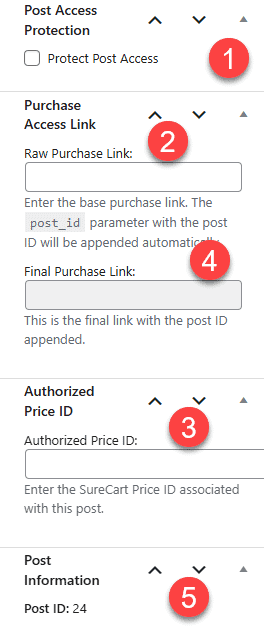
- We check this if we want to protect this post
- This is our buy link from surecart (See Getting your Price ID and Buy Link)
- This will be autogenerated once the page is saved, but it isn’t needed by you; it’s shown for reference
- This is the authorised price id from surecart (See Getting your Price ID and Buy Link)
- This shows you the current price ID. This is useful for testing and for fault-finding.
This will then protect our post, and it will only unlock on purchase.
See partially protecting a post to see how to leave an excerpt visible as a little taster for your readers.
The video below will show you the process of protecting your first post: