
Web hook Response Information
Response for Sure Forms – API Documentation
This documentation outlines the options available for Response for Sure Forms. It covers required parameters, default behaviour, optional settings, and how they can be combined to customise the response.
A return URL is submitted with the webhook response, along with the session_id and form_id. You will need all three, plus your message, to return a working response.
Required parameters
These parameters must be included in the POST request for the webhook to work.
| Parameter | Description | Required |
|---|---|---|
session_id | A unique identifier for the session. | Yes |
form_id | The unique identifier for the form. | Yes |
body | Only required if no other parameters are set. Can be plain text or HTML. | Yes (see description) |
Minimum response example
Example response to send from your automation platform:
Optional parameters
The following parameters are optional and can be used to customise the response:
| Parameter | Default value | Description |
|---|---|---|
body_display | "yes" | Controls whether the body is shown. "yes" shows it; "no" hides it and shows a default message. |
link_url | N/A | A clickable link, displayed as an anchor (<a>) element. |
custom_link_text | N/A | Custom text for the link; replaces the default “Visit Link” text. |
copy_button | "no" | If "yes", shows a button to copy the contents of body to the clipboard. |
image_url | N/A | The image URL to display; documentation describes it as HTML/image data passed with an html property. |
pdf_url | N/A | URL of the PDF document to display. |
has_link | "no" | If "yes", displays a link. |
has_image | "no" | If "yes", displays an image. |
has_pdf | "no" | If "yes", displays a PDF link or embedded PDF. |
enable_back_button | "no" | Added in v1.1. If "yes", displays the back button. |
has_video | N/A | Added in v1.1. If "yes", looks for the video URL and custom text, if set. |
has_audio | N/A | Added in v1.1. If "yes", looks for the audio URL and custom text, if set. |
audio_url | N/A | Added in v1.1. The audio URL. |
video_url | N/A | Added in v1.1. The video URL. |
redirect_url | N/A | Added in v1.1.1. If present, redirects to this URL and stops processing other response items. Supports URL parameters and other URL data for custom redirects. |
Configuring your automation
There are many automation platforms. The example below uses FlowMattic, but the layout will differ between platforms. The data sent must be the same.
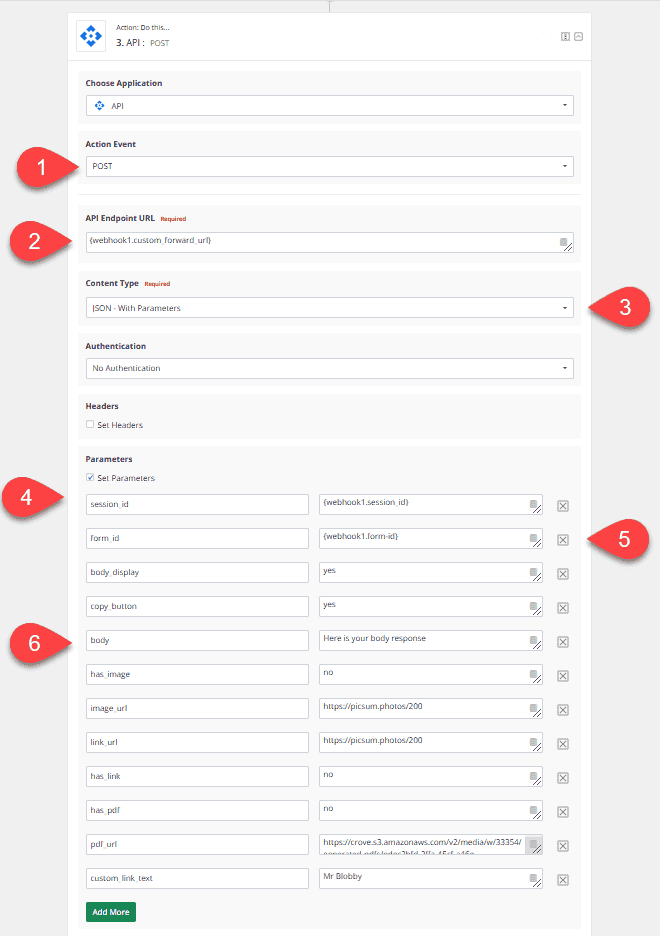
All automation plugins and services are laid out differently, but they require the same information:
- Create an API POST event, because you are sending data.
- Map the endpoint provided in the submitted data to the request URL. For example: https://domain.com/wp-json/responsefsf/v1/receive-response.
- Send the request in standard JSON format with the appropriate parameters.
- Map the
session_idsupplied in the initial form response. Example:responsefsf_67559df047c388.08927290. - Map the
form_idsupplied in the form submission. The format and type depend on the form plugin. - Include a
bodymessage. You can hide the message withbody_displayset to"no", but thebodyfield should still be sent.